Online Registration In Banner
INTRODUCTORY REGISTRATION INFORMATION
Revised March 5, 2026
- Plan for registration by reviewing the online schedule of courses as well as your DegreeWorks Degree Evaluation found within your Student Profile in Banner SSB
- Make an appointment with your academic advisor to discuss your schedule and academic concerns. All undergraduate students and M.Ed. students must meet with their advisors and obtain a Registration PIN before registering for fall and spring courses. Aside from M.Ed. students, advising holds are not placed on any students’ record for summer courses. You will not be able to register or adjust your schedule for fall or spring courses in Banner unless you have your Registration PIN as it will be required each time you attempt to make an adjustment to your schedule. If you forgot who your advisor is, you can view this information under your Student Profile.
- In Banner SSB under Student Profile, view holds on the upper right hand side that may prevent registration. If you have an active hold that may prevent registration, work with the appropriate office to remove the hold(s) before your registration window
- Make sure that you register between the start and end date and time of your registration window. Review the Registration Appointment Times link to see when you may register.
- Consider using the Plan Ahead Registration Feature in Banner SSB to save time when registering.
- Should you encounter error messages during your registration, This Registration Error Chart will help to explain the message.
- If you have been given permission to enroll in a closed class or permission of instructor to enroll in a class, you can proceed to log in to Banner SSB and follow the regular registration instructions to register for the course.
- Once you finish registering, print your schedule for your records or easily add it to your Outlook Calendar via Banner SSB.
- You may change your schedule during the adjustment period or during drop/add.
HOW TO REGISTER FOR CLASSES VIA BANNER SSB
Should you need to access a version of this tutorial video that include Audio Descriptions, one is available at https://umw.screencasthost.com/watch/cOnOrcn09OY
COURSE SCHEDULE AND CLASS SEARCH PAGE INFORMATION
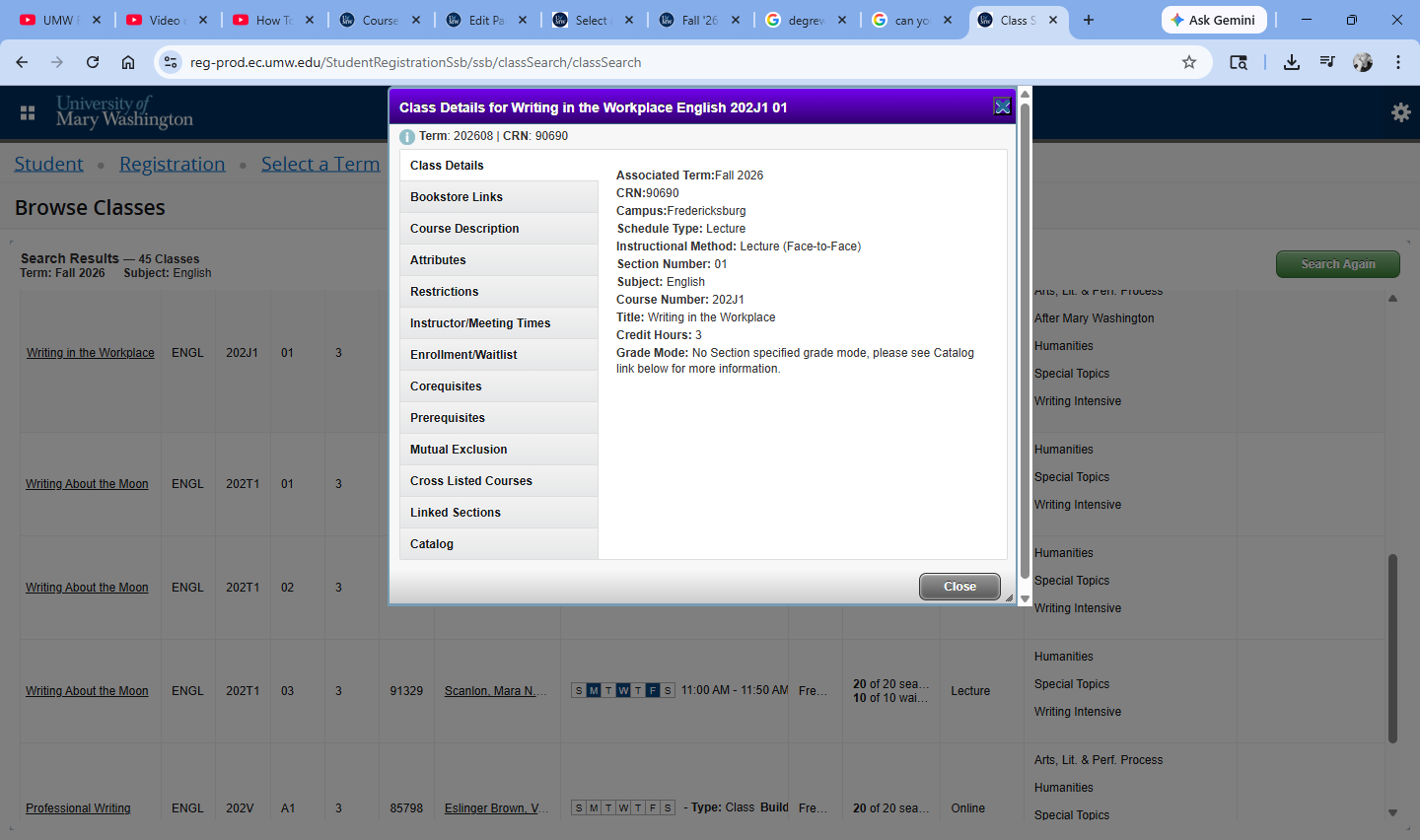
The schedule of classes features basic and advanced search functions. To see all classes on the schedule, leave all criteria blank. To narrow your search, use basic search functions such as level (Undergraduate vs. Graduate), subject (i.e. Accounting), and course number (i.e. 101). Advanced Search allows you to search using additional criteria such as department, instructor, buildings, meeting days, meeting times, etc.
Search results will provide specific information for every each course on the schedule. Click on the title link of a course for the ability to view additional details such as course description, link to our bookstore, and course restrictions and prerequisites if applicable.
PLAN AHEAD REGISTRATION FEATURE
Consider using the Plan Ahead Registration Feature in Banner SSB to save time when registering. The excerpt of the Registration Tutorial below will take you through the process.
WAITLIST INFORMATION
Some classes have a waitlist option. The waitlist feature is not available until the online adjustment period begins. If a class with a waitlist option is full, students may put themselves on the waitlist through Banner SSB. When an open seat becomes available, the student in the first waitlist position will receive an email and have 48 hours to go online and add the class. The open seat will be reserved for that student for 48 hours FROM the time the email was sent. During this 48-hour time period, the student can add and drop the waitlisted class in the Add/Drop screen in Banner SSB. If the student fails to register for the class within those 48 hours, the next student on the list will be notified and have 48 hours to register for the class. If you have a Registration Hold on your record, you will not be able to register for the class. The excerpt of the Registration Tutorial below will take you through the process.
Frequently Asked Questions about Waitlisting
How do I get on a waitlist?
- Log in to Banner SSB
- Go to Student Profile -> Registration and Planning
- Select Term & Choose Class Search
- Select Class to Add and Submit
- If class is closed and has a wait list, you will get a Registration Add Error
- If you wish to add yourself to the wait list, choose Wait Listed from the drop down action field and select Submit
How do I know my position on the waitlist?
After you have placed yourself on the waitlist, you can view your position by going to Student Detail Schedule and selecting the correct term. If your waitlist position is 1, this means that you are next in line to receive an email notification if a seat becomes available in the class.
What do I do when I get a waitlist email notification?
When you receive an email notification you have 48 hours from the email notification to add the class. You must:
- Log into Banner SSB
- Go to Student Profile -> Registration and Planning and select the correct term
- Choose appropriate action (Web Registered to register; DROP WEB to remove yourself from the Waitlist) & select Submit
- SOME TIPS:
- To Waitlist a course, you must meet all course requirements (prerequisites, program restrictions, etc.)
- If you’ve added yourself to a waitlist, be sure to check your e-mail often (at least twice a day) for waitlist email notifications
- If you have a hold on your record, it may prevent you from registering for the course. Clear registration holds from your record as soon as possible
- If you are registered for a different section of the same class, you need to DROP the section that you are registered so that you can add the waitlisted section
- Make sure that you will not have a time conflict for the waitlisted class with a class that you are already registered for
- If you are waitlisted for other sections that you no longer want, please drop them so that other students can move up on the waitlist.
What happens if I do not register for the course within the 48 hour time frame?
If you do not register for the course within the 48 hours after the email notification, you will automatically be dropped from the wait list. The next student on the wait list would then move to the top of the list. Therefore, if you add yourself to a waitlisted class, be sure to check your e-mail often.
As a Senior/Junior, do I get priority over a freshman?
During advanced registration at the beginning of the registration period you will have priority over underclassmen. However, once registration is open for everyone, all classes that have a waitlist operate on a first-come, first-serve basis.
Can I add myself to a waitlist for more than one section of the same course?
Yes. Although you may not officially register for two or more sections of the same class, you may add yourself to the waitlists of more than one section of a course. The system will allow you to stay in your current section and also get on the waitlist for additional sections of the course. If you are notified via email that a seat is now available in a different section, you will first need to drop the class for which you are registered, and then you may register for the section in which you were previously waitlisted. Please drop yourself from any classes or waiting lists that you do not intend to take.
Can I add myself to a waitlist for a class that has a time conflict with another course?
The system will allow you to waitlist a class that has a time conflict with another course that you are registered. However, if you should receive an email notification that you can register for the waitlisted course, you will need to drop any course for which you are registered for that has a time conflict before you will be able to register for the waitlisted course.
What if I drop my waitlisted class by accident? Can I get back in?
If you are still within your 48 hour window, yes. You can add the class back to your schedule by going to Add/Drop classes, search for the course (or type the CRN # of the course into the Enter CRN field), and select Submit. This will register you for the course. However, if the 48 hour window has expired, you will not be able to register for the course and would have to add yourself back to the waitlist (if space is available) if you still wanted to take the course.
What does an Open – Reserved for Waitlist error message mean?
If you should receive this message when trying to register for a class, it means that although the system is currently showing a seat available, this seat is being reserved for the next student on the waitlist. If you receive this message, you can choose to add yourself to the wait list by choosing Wait Listed from the drop down action field and selecting Submit.
When does the option to waitlist a class end?
The option to waitlist a class will end one week before the term begins. Any students still on a waitlist for a class at that time will be removed.